
To understand the Arduino UNO Q, it is helpful to move beyond the traditional single-microcontroller mental model used for classic Arduino boards.
The UNO Q is fundamentally different.
👉 It is not a single microcontroller board.
The Arduino UNO Q is officially positioned as a Single-Board Computer (SBC), meaning it can operate autonomously as a complete computing system.
From a user perspective, it behaves like a small Linux computer capable of running applications, managing networking, and interfacing with USB peripherals.
Internally, however, the board integrates two independent processing subsystems :
- A Linux-based MPU for high-level computing
- A real-time MCU running Zephyr RTOS for deterministic hardware control
These two systems cooperate through an internal bridge, forming a hybrid architecture that combines the flexibility of a Linux SBC with the determinism of a microcontroller platform.
Understanding this distinction helps avoid confusion between the board’s marketing classification (SBC) and its internal technical organization (dual-system architecture).
Using the Arduino UNO Q as a Single-Board Computer does not involve enabling any software mode.
Instead, it refers to operating the board autonomously as a Linux system.
In practice, this requires connecting the board through a USB-C multi-function hub that provides :
- Power Delivery (PD) to supply stable power to the board
- USB host ports for peripherals such as keyboard, mouse, USB camera
- An HDMI output for video display
Because the UNO Q exposes only a single USB-C connector, a multi-function USB-C hub is required for standalone SBC operation.
Once connected in this way, the board boots Linux automatically and behaves like a small single-board computer.
The UNO Q contains two completely independent processing systems :
This is a full embedded Linux system.
It handles :
- App Lab
- Python programs
- Networking
- File storage
- Web interfaces
- High-level processing
Beyond running applications and managing system logic, the Linux MPU also acts as a USB host.
Unlike traditional Arduino boards, where the USB port is primarily used to communicate with a PC, the USB-C port on the UNO Q can be used to directly connect external peripherals such as :
- USB cameras
- GPS receivers
- Storage devices
- Network adapters
- Human interface devices.
This capability significantly expands the range of usable peripherals.
In many cases, it is also more efficient to connect high-bandwidth devices directly to the MPU rather than routing data through the MCU and the internal bridge.
Think of it as a small single-board computer, similar to a Raspberry Pi.
This is an STM32 microcontroller running the Zephyr RTOS.
It handles :
- GPIO control
- sensors
- timing-critical operations
- interrupts
- the Arduino sketch execution
- etc
This part behaves like a traditional microcontroller.
🔗 How These Two Worlds Work Together
Although they are separate systems, the Linux side and the microcontroller side communicate through an
internal bridge.
This bridge allows :
- Python code on Linux to call functions on the MCU
- The MCU to receive commands from Linux
You can think of this as an invisible cable connecting two computers.
🧭 A Simple Mental Model
The easiest way to understand the UNO Q is to imagine :
A Raspberry Pi connected internally to an STM32 microcontroller.
Where :
- The Raspberry Pi (Linux side) manages logic, UI, and networking
- The STM32 (MCU side) handles real-time hardware control
This is exactly how the UNO Q operates.
Many confusions about the UNO Q come from assuming it behaves like a classic Arduino board.
It does not.
A traditional Arduino has :
- one processor
- one firmware (your sketch)
The UNO Q instead has :
- two processors
- two operating systems
- two execution environments
Understanding this dual-system architecture is the key to understanding everything else
about the UNO Q.
🎯 What Comes Next
Now that we have the big picture, the next step is to explore the hardware architecture in more detail.
In the next section, we will look at :
- the Linux MPU
- the STM32 microcontroller
- how the internal bridge works
⭐ Overview.
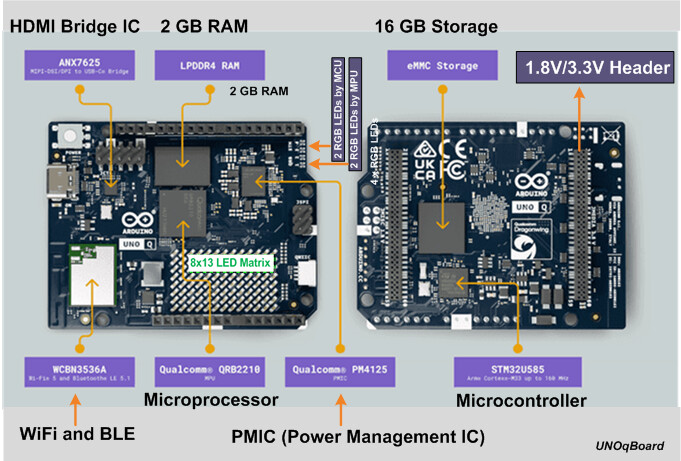
The following diagram provides a high-level view of the main hardware modules present on the Arduino UNO Q board.
The board integrates two major processing subsystems :
-
The Linux MPU side, which includes the Qualcomm QBR2210 processor, RAM, eMMC storage, WiFi/BLE module, and power management components.
-
The STM32 MCU side, which includes the STM32U585 microcontroller responsible for real-time hardware control and execution of Arduino sketches.
Additional onboard components include an HDMI bridge IC, a power management IC (PMIC), and dedicated headers exposing both MPU and MCU interfaces.
This organization illustrates the hybrid nature of the UNO Q, combining a Linux single-board computer with a real-time microcontroller platform.
Now that we understand that the UNO Q contains two independent systems, we can look more closely at the hardware that makes this possible.
The board is composed of three key elements :
1️⃣ The Linux MPU (high-level processing)
2️⃣ The STM32 MCU (real-time control)
3️⃣ The internal communication bridge between them
The first major component of the UNO Q is a full embedded Linux system.
This part is often called the MPU (Microprocessor Unit) because it runs a complete operating system.
📊 Main Characteristics
The Linux side includes :
- A high-performance ARM processor
- 2 GB of DRAM (or 4 : Version “extended”)
- 16 GB of storage (or 32 : Version “extended”)
- A full Linux operating system
This makes it much more powerful than a traditional Arduino board.
🎯 Responsibilities of the Linux Side
- The Linux system handles all high-level tasks, such as:
- Running Python applications
- Serving web interfaces (WebUI)
- Network communication (WiFi, Ethernet, etc.)
- File management
- Compiling Arduino sketches
- Managing App Lab
In short :
👉 The Linux side is responsible for logic, connectivity, and user interaction.
Despite its power, the Linux side is not designed for :
- real-time hardware control
- precise timing operations
- direct GPIO management
This is where the STM32 microcontroller comes in.
The second key component of the UNO Q is the STM32U585 microcontroller.
This is the real-time hardware controller of the board.
📊 Main Characteristics
The STM32 MCU includes :
- ARM Cortex-M33 core
- 2 MB of internal Flash memory
- 768 KB of SRAM
- Built-in system boot ROM
Unlike the Linux MPU, this microcontroller does not run a full operating system like Linux.
Instead, it runs a real-time operating system called Zephyr RTOS.
🎯 Responsibilities of the STM32 MCU
The MCU is responsible for all real-time hardware tasks, including :
- Digital and analog I/O
- Sensor interfacing
- Interrupt handling
- Timing-critical operations
- Executing the Arduino sketch
This is the part that behaves most like a traditional Arduino board.
⚙️ 3. Zephyr RTOS — The Hidden Layer
Between the hardware and your Arduino sketch sits an important component :
👉 Zephyr RTOS
This real-time operating system manages :
- task scheduling
- hardware abstraction
- device drivers
- execution of the sketch
Unlike traditional Arduino boards, your sketch is not the main firmware.
Instead :
The sketch is a program that runs on top of Zephyr.
This is a fundamental architectural difference.
Although the Linux MPU and STM32 MCU are separate systems, they communicate through an internal bridge.
This bridge is a software communication channel that allows bidirectional. communication between the two systems.
It enables :
- Linux applications to send commands to the MCU
- The MCU to send data or events to Linux
For example, a Python program can call :
Bridge.call("updateTime", h, m, s)
This sends a message to the STM32, which then executes the corresponding function in the Arduino sketch.
Conversely, the MCU can also transmit information back to the Linux side, such as sensor readings, status updates, or event notifications.
🧠 A Simple Way to Visualize the Bridge
You can imagine the bridge as :
A private serial connection between two computers on the same board.
This communication layer is what enables the hybrid architecture of the UNO Q.
⭐ Summary of the Hardware Architecture
The UNO Q hardware can be summarized as :
Linux MPU → High-level processing
STM32 MCU → Real-time control
Bridge → Communication between both
Each component has a clearly defined role, and together they form a powerful hybrid system.
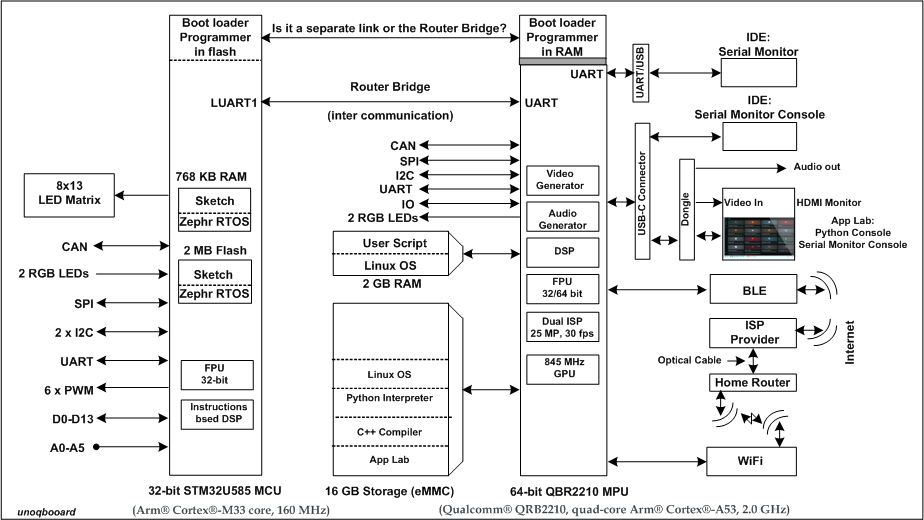
⭐ Why This Section Matters.
The Arduino UNO Q integrates two very different processing systems :
- A high-level Linux microprocessor (MPU)
- A real-time microcontroller (MCU)
Understanding their internal architecture helps explain why each side excels at specific tasks.
The STM32U585 is based on an ARM Cortex-M33 core designed for deterministic real- time control.
It is optimized for :
- precise timing
- low latency
- direct hardware interaction
📊 Key Internal Features
The MCU includes :
- 32-bit ARM Cortex-M33 CPU (up to 160 MHz)
- Single-precision Floating Point Unit (FPU)
- DSP instruction extensions
- 2 MB internal Flash memory
- 768 KB SRAM
- Hardware peripherals (SPI, I2C, UART, CAN, ADC, PWM)
⚙️ FPU — Fast Floating-Point Calculations
The integrated FPU accelerates mathematical operations using floating-point numbers.
This is useful for :
- sensor data processing
- filtering algorithms
- physical computations
🧪 Example — FPU Usage
float compute_rms(float* samples, int n) {
    float sum = 0.0f;
    for (int i = 0; i < n; i++) {
        sum += samples[i] * samples[i];
    }
    return sqrtf(sum / n);
}
This function benefits from the hardware FPU for fast multiplication and square-root operations.
⚙️ DSP Extensions — Efficient Signal Processing
The Cortex-M33 includes DSP instructions optimized for :
- multiply-accumulate operations
- digital filtering
- real-time signal analysis
🧪 Example — DSP-Style Operation
int32_t dot_product(int16_t* a, int16_t* b, int n) {
    int32_t result = 0;
    for (int i = 0; i < n; i++) {
        result += a[i] * b[i];
    }
    return result;
}
This type of computation is accelerated by DSP instructions.
🎯 Why This Matters on the UNO Q
The STM32 architecture is designed for :
- deterministic execution
- real-time responsiveness
- efficient low-level hardware control
This is why all timing-critical tasks are handled by the MCU.
The Linux side of the UNO Q is powered by the Qualcomm QBR2210, a high-performance embedded microprocessor.
Unlike the MCU, it is designed for :
- complex computation
- multitasking
- operating system execution
📊 Key Internal Features
The MPU includes :
- Quad-core ARM Cortex-A53 CPU
- 64-bit architecture
- Multi-level cache hierarchy
- NEON SIMD acceleration engine
- Integrated GPU
- Dedicated DSP blocks
- LPDDR4 memory controller
⚙️ NEON SIMD Engine
The NEON unit accelerates :
- multimedia processing
- image analysis
- vectorized calculations
This is particularly useful for :
- machine vision
- audio processing
- high-throughput data operations
🎯 Why This Matters on the UNO Q
The QBR2210 is optimized for :
- running Linux
- handling networking and storage
- executing high-level applications
- processing large data streams
It provides computing power similar to a small single-board computer.
🔗 Complementary Roles
The internal architecture of both processors explains their cooperation :
| Capability | STM32 MCU | QBR2210 MPU |
|---|---|---|
| Real-time control | ✔ | |
| GPIO handling | ✔ | |
| Deterministic timing | ✔ | |
| Linux applications | ✔ | |
| Networking | ✔ | |
| High-level processing | ✔ |
Together, they form a hybrid computing platform that combines real-time control with high-level computing power.
⭐ Key Takeaway
If you remember only one idea from this section :
The STM32 MCU is optimized for deterministic real-time hardware control, while the QBR2210 MPU is optimized for high-level Linux computing. Their internal architectures reflect these fundamentally different roles.
⭐ Overview
Now that we understand the hardware components of the UNO Q, the next step is to see how they actually work together during operation.
This section explains :
- How the board starts up
- How a sketch is uploaded
- How the sketch is executed on the MCU
- How memory is used
Understanding this workflow is essential to fully grasp how the UNO Q differs from traditional Arduino
boards.
When the UNO Q is powered on, two independent boot processes occur — one on the STM32 MCU and
one on the Linux MPU.
Step 1 — MCU Hardware Boot (Mask ROM)
The first system to start is the STM32 microcontroller.
Inside the MCU, a small internal ROM — programmed at the factory — executes automatically.
This built-in boot code performs :
- basic hardware initialization
- selection of the boot source
- loading of the main firmware
This ROM cannot be modified by the user.
Step 2 — Zephyr RTOS Starts
After the hardware boot phase, the MCU loads and starts :
👉 Zephyr RTOS
Zephyr is permanently stored in the MCU Flash memory.
At this stage, the MCU is fully operational and ready to run applications.
Step 3 — Linux Boots Independently
In parallel, the Linux MPU starts its own independent boot process :
- Linux kernel loads
- system services start
- App Lab environment becomes available
The Linux side and the MCU side do not wait for each other — they boot independently.
Uploading a sketch to the UNO Q is very different from traditional Arduino boards.
Step 1 — Compilation Happens on Linux
When you build a sketch :
- The code is compiled on the Linux side
- Zephyr-compatible binaries are generated
Like classic Arduino boards, the MCU never performs compilation. The sketch is compiled externally — on a PC for traditional boards, and on the Linux MPU for the UNO Q.
Step 2 — The Binary Is Sent to the MCU
The compiled binary is then transferred internally from the Linux MPU to the STM32 MCU using the communication bridge.
This transfer is entirely automatic and invisible to the user.
Step 3 — Zephyr Loads the Sketch
Once received, Zephyr takes control and loads the sketch into memory.
At this point, the sketch becomes a running application under Zephyr’s supervision.
This is a key difference from traditional Arduino systems.
Traditional Arduino Model
On classic Arduino boards :
T- he sketch is the main firmware
- It runs directly after boot
UNO Q Execution Model
On the UNO Q :
- Zephyr RTOS is always the main firmware
- The sketch runs as a user program inside Zephyr
This means :
👉 Your sketch is not the "owner" of the MCU — Zephyr is.
Zephyr manages :
- scheduling
- hardware access
- task execution
Understanding memory usage helps explain many behaviors of the UNO Q.
Zephyr Storage
Zephyr is permanently stored in the MCU Flash memory.
It remains installed even when sketches change.
Sketch Storage — Current Behavior
Currently, when using App Lab :
- The sketch is loaded into MCU RAM
- It is reloaded each time the application starts
This ensures a clean runtime environment.
Sketch Storage — Upcoming Improvement
An upcoming enhancement introduces a new behavior :
- The sketch will be stored persistently in Flash memory
- A hash will be used to detect changes
- Uploads will be skipped when no changes are detected
This will significantly reduce startup time.
Once everything is running, communication between the Linux MPU and the STM32 MCU is fully bidirectional.
- Linux applications can send commands to the MCU.
- The MCU can send data or events back to Linux.
For example, Python code running on Linux can call:
Bridge.call("updateTime", h, m, s)
This sends a message to the MCU, which then executes the corresponding Arduino function.
In the opposite direction, the MCU can also report information to Linux, allowing applications to monitor sensors, log events, or update user interfaces in real time.
⭐ Summary of the Operational Workflow
The complete operational flow of the UNO Q can be summarized as :
Power On → MCU ROM Boot → Zephyr Starts → Linux Boots → Sketch Loaded → Runtime Interaction via Bridge
Each step is independent but coordinated through the internal architecture.
🎯 What Comes Next
Now that we understand how the UNO Q operates internally, the final step is to develop a practical mental
model and explore real-world usage scenarios.
In the next section, we will cover :
- a simple mental model for daily use
- a real command flow example
- common misconceptions
⭐ Why This Part Matters
By now, we understand :
- The UNO Q has two independent systems.
- Zephyr runs on the MCU.
- Linux runs on the MPU.
- A bridge connects both worlds.
But understanding architecture is not enough.
We now need a practical mental model — something you can use every day when developing.
The simplest way to think about the UNO Q is :
The Linux side thinks. The STM32 side acts.
Or more precisely :
- Linux decides what should happen.
- The MCU decides how it happens in real time.
Example
Suppose you build a web interface that controls an LED.
- The web interface runs on Linux.
- The user clicks a button.
- Python code runs.
- A message is sent to the MCU.
- The MCU toggles the LED.
Linux handles the logic and user interaction.
The MCU handles the physical hardware.
The internal bridge is not one-way.
It allows :
Linux → MCU
MCU → Linux
Linux → MCU
- Send commands
- Update hardware
- Trigger functions
MCU → Linux
- Report sensor data
- Send status updates
- Notify events
This bidirectional communication is essential for hybrid applications.
Let’s follow a concrete scenario :
Scenario: Displaying the Current Time on an LED Matrix
- Linux reads the system time.
- Python formats the time.
- Python calls :
Bridge.call("updateTime", h, m, s)
- The MCU receives the call.
- The Arduino sketch updates the LED matrix.
Now reverse direction :
- A sensor connected to the MCU detects an event.
- The MCU sends a message back.
- Linux logs the event or updates the WebUI.
This is the true hybrid workflow of the UNO Q.
Understanding what the UNO Q is not is just as important.
❌ Misconception 1 — “It’s just a powerful Arduino.”
No.
It is a dual-system platform.
❌ Misconception 2 — “The sketch controls everything.”
No.
Zephyr controls the MCU.
Linux controls high-level logic.
The sketch runs inside a managed environment.
❌ Misconception 3 — “Linux can directly control GPIO in real time.”
Not reliably.
Precise timing should always be handled by the MCU.
A practical rule of thumb :
| Task Type | Use Linux | Use STM32 |
|---|---|---|
| Web server | ✔ | |
| Network communication | ✔ | |
| File storage | ✔ | |
| Sensor reading | ✔ | |
| Precise timing | ✔ | |
| Motor control | ✔ | |
| UI logic | ✔ |
This separation makes your projects stable and scalable.
⭐ Final Mental Summary
If you remember only one sentence from this tutorial, remember this :
The UNO Q is a cooperative system where Linux handles intelligence and connectivity, and the STM32 handles deterministic real-time hardware control. Everything else builds upon this idea.
🎉 The previous sections described the internal architecture and operation of the UNO Q as a dual-system platform. These concepts apply regardless of how the board is used. However, in practice, there are two distinct development workflows, which differ in how the Linux MPU participates in the execution flow.
The Arduino UNO Q supports two different development workflows.
Understanding this distinction is important.
🟢 Workflow 1 — Arduino App Lab (Linux-Based)
In this mode :
- The sketch is compiled on the Linux MPU.
- The binary is transferred internally to the MCU.
- Zephyr loads and executes the sketch.
This workflow enables full interaction between Linux applications and the MCU
through the internal bridge.
It is the native operating mode of the UNO Q.
🔵 Workflow 2 — Arduino IDE (Direct MCU Upload)
When using the Arduino IDE:
- The sketch is compiled on the host computer.
- The binary is uploaded directly to the STM32 MCU.
- The Linux side is not involved in this process.
In this mode, the UNO Q behaves similarly to a traditional Arduino board, with Zephyr acting as the underlying runtime system.
Unlike Arduino App Lab, the Arduino IDE allows the user to choose where the sketch is loaded :
- It can be executed from RAM for faster startup, or
- Stored persistently in Flash memory.
This selection is available through the Tools → Flash Mode menu in the Arduino IDE.
⭐ Key Difference
The main difference between these workflows is where the compilation occurs and whether the Linux system participates in the execution flow.
⭐ Sketch Upload Optimization
To improve efficiency, the UNO Q uses a hash-based mechanism to detect whether the compiled sketch has changed.
Before uploading, the system compares the new binary with the previously loaded version.
If no changes are detected, the upload process is skipped.
This optimization is now implemented for both Arduino App Lab and the Arduino IDE.
However, a key difference remains :
- In the Arduino IDE, sketches can be stored persistently in Flash memory.
- In Arduino App Lab, sketches are currently still loaded into RAM only.
Support for persistent Flash storage in App Lab is planned for future updates.