Skip to content

Instantly share code, notes, and snippets.

@marfillaster
marfillaster / 00-tldr-ipv6-over-wireguard-vultr-mikrotik.md
Last active May 11, 2026 10:09
MikroTik RouterOS v7 — IPv6-over-WireGuard Relay via Vultr Reserved /64

TL;DR: IPv6-over-WireGuard relay — Vultr VPS + MikroTik

This paste assumes a Vultr Ubuntu cloud-compute instance with default Vultr-issued IPv6 and a home MikroTik RouterOS v7 in roughly the standard defconf state (LAN bridge, IPv6 firewall defconf rules). It gives the home LAN a globally routable IPv6 /64 over a WireGuard tunnel without NAT66 and without DHCPv6-PD.

If your VPS is on a different cloud, your home router is not MikroTik, or the LAN is not behind a single bridge, read the full guide and substitute. The validation report shows the actual end-to-end captures.

For the DNS-over-HTTPS + IPv6 RA RDNSS setup, use the companion DNS gist: https://gist.github.com/marfillaster/d34bd199b9e265ccd74af6d31fd9df85

Resulting layout after the paste:

cert-info.sh

cert-info.sh is a lightweight Bash utility for fetching and displaying SSL/TLS certificate details for one or more domains.
It supports both human-readable CSV output and structured JSON output, with options to override IP resolution globally or per-domain.


Features

  • Retrieve SSL/TLS certificate details including:
@marfillaster
marfillaster / unifi_container_rb5009.md
Last active May 10, 2026 19:15
Running Unifi Network Controller as a container in MikroTik ROSv7 RB5009

Requirement

  • USB flash drive - this is where the container filesystem will be persisted

Set-up docker bridge network

/interface bridge add name=docker

Set-up veth to be used by container

@marfillaster
marfillaster / Converge-F670L.md
Last active March 6, 2026 10:12
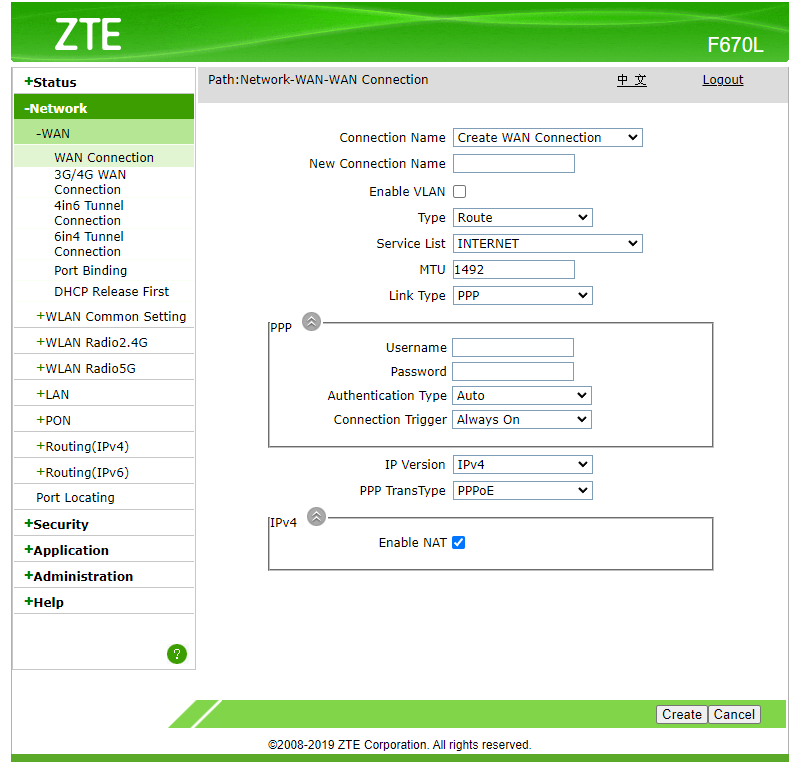
Converge F670L Bridge mode
  1. Go to Network - WAN - WAN Connection WAN Connection
  2. Right click Type Route dropdown select and click "Inspect" in the context menu.
    In console, run the code below:
    document.getElementById('Frm_mode').options[document.getElementById('Frm_mode').options.selectedIndex].setAttribute('value', 'BRIDGE');
    Change_mode();
    
    output2
  3. Input New Connection Name. Example: Bridge. Click Create.
@marfillaster
marfillaster / guide.md
Last active September 8, 2024 17:41
Ubiquiti UniFi Guest SSID on VLAN using MikroTik router hybrid port
  • Main network on 192.168.88.0/24
  • Guest network on 172.16.0.0/24 VLAN20
  • UniFi AP is connected to a MikroTik router ether2 via DHCP assignment
  • UniFi AP can be managed on via main network
  • MikroTik initially on default configuration
/interface bridge port
add bridge=bridge interface=ether2
@marfillaster
marfillaster / 00-tldr-default-config-dual-wan-pcc-recursive-failover.md
Last active May 6, 2026 20:55
MikroTik RouterOS v7 dual DHCP WAN recursive failover w/ PCC load-balancing; and recursive ECMP

TL;DR: Default-Config Dual WAN PCC + Recursive Failover

This paste assumes a hardware MikroTik RouterBOARD with the standard MikroTik default config — hAP, hEX, RB5009-class, etc. — where ether1 is the WAN port and ether2 through etherN are LAN bridge ports. The paste removes ether2 from the LAN bridge and turns it into WAN2.

If your router is not in that default state — CHR, multi-WAN appliances, anything reconfigured, or anything where ether1 is not your WAN — read the full guide and substitute interface names. The lab report's §8.7 TL;DR validation shows the kind of remap CHR needs before this paste is safe.

Resulting layout after the paste:

WAN1 = ether1, DHCP
@marfillaster
marfillaster / guide.md
Last active March 17, 2025 13:26
yubikey ssh ykcs11 in osx

Generate key

brew install ykman yubico-piv-tool

# Generate key
ykman piv keys generate -aRSA2048 --pin-policy ONCE --touch-policy CACHED 9a public.pem


# Generate self signed key
ykman piv certificates generate -s "CN=yubi-1 ssh" -aSHA256 9a public.pem
@marfillaster
marfillaster / bridge-mode.md
Last active July 28, 2025 09:09
PLDT VDSL HG180U notes

Bridge mode

This guide will enable bridge mode in ethernet port 3 only. Wifi and ethernet ports 1 and 2 will remain in route mode.

Use cases:

  • Avoid double NAT.
  • Improve WiFi performance by using dedicated and/or more modern equipment.
@marfillaster
marfillaster / README.md
Last active May 11, 2026 00:21
MikroTik RouterOS v7: DoH + ULA DNS via IPv6 RA RDNSS

MikroTik RouterOS v7: DoH + IPv6 RA RDNSS with ULA DNS

Self-contained paste for a RouterOS v7 LAN that already has IPv6 SLAAC working. It makes the router the LAN DNS resolver, sends upstream DNS through Cloudflare DoH, advertises the router's ULA as DNS via RA RDNSS, and stops DHCPv4 from advertising 192.168.88.1 as DNS while keeping admin@192.168.88.1 management working.

DNS companion/update for: https://gist.github.com/marfillaster/a80d378124db0d879a962ce73d31b345

Replace:

  • <LAN_BRIDGE> with your LAN bridge, usually bridge
  • <LAN_GUA> with the router's LAN GUA, for example 2001:db8:1:1::1

Keybase proof

I hereby claim:

  • I am marfillaster on github.
  • I am marfillaster (https://keybase.io/marfillaster) on keybase.
  • I have a public key whose fingerprint is 9828 F7AA 8E16 009E A8FB 5913 3798 FD80 20D3 229E

To claim this, I am signing this object: