Skip to content

Instantly share code, notes, and snippets.

@krzys-h
Last active December 11, 2025 09:12
Show Gist options
  • Select an option

  • Save krzys-h/e2def49966aa42bbd3316dfb794f4d6a to your computer and use it in GitHub Desktop.

Select an option

Save krzys-h/e2def49966aa42bbd3316dfb794f4d6a to your computer and use it in GitHub Desktop.
Ubuntu 21.04 VM with GPU acceleration under Hyper-V...?

Ubuntu 21.04 VM with GPU acceleration under Hyper-V...?

Modern versions of Windows support GPU paravirtualization in Hyper-V with normal consumer graphics cards. This is used e.g. for graphics acceleration in Windows Sandbox, as well as WSLg. In some cases, it may be useful to create a normal VM with GPU acceleration using this feature, but this is not officially supported. People already figured out how to do it with Windows guests though, so why not do the same with Linux? It should be easy given that WSLg is open source and reasonably well documented, right?

Well... not quite. I managed to get it to run... but not well.

How to do it?

  1. Verify driver support

Run Get-VMHostPartitionableGpu in PowerShell. You should see your graphics card listed, if you get nothing, update your graphics drivers and try again.

  1. Create a new VM in Hyper-V Manager.

Make sure to:

  • Use Generation 2
  • DISABLE dynamic memory (it interferes with vGPU on Windows so it probably won't work on Linux either, I didn't check this yet though)
  • DISABLE automatic snapshots (they are not supported with vGPU and will only cause problems)
  • DISABLE secure boot (we'll need custom kernel drivers, and I never tried to make this work with secure boot)
  • Don't forget to add more CPU cores because the stupid wizard still adds only one vCPU...
  1. Add GPU-PV adapter

From PowerShell running as administrator:

Set-VM -VMName <vmname> -GuestControlledCacheTypes $true -LowMemoryMappedIoSpace 1GB -HighMemoryMappedIoSpace 32GB
Add-VMGpuPartitionAdapter -VMName <vmname>
  1. Install Ubuntu 21.04 in the VM like you would usually

  2. Build the dxgkrnl driver

Until Microsoft upstreams this driver to the mainline Linux kernel, you will have to build it manually. Use the following script I made to get the driver from the WSL2-Linux-Kernel tree, patch it for out-of-tree build and add it to DKMS:

#!/bin/bash -e
BRANCH=linux-msft-wsl-5.10.y

if [ "$EUID" -ne 0 ]; then
    echo "Swithing to root..."
    exec sudo $0 "$@"
fi

apt-get install -y git dkms

git clone -b $BRANCH --depth=1 https://github.com/microsoft/WSL2-Linux-Kernel
cd WSL2-Linux-Kernel
VERSION=$(git rev-parse --short HEAD)

cp -r drivers/hv/dxgkrnl /usr/src/dxgkrnl-$VERSION
mkdir -p /usr/src/dxgkrnl-$VERSION/inc/{uapi/misc,linux}
cp include/uapi/misc/d3dkmthk.h /usr/src/dxgkrnl-$VERSION/inc/uapi/misc/d3dkmthk.h
cp include/linux/hyperv.h /usr/src/dxgkrnl-$VERSION/inc/linux/hyperv_dxgkrnl.h
sed -i 's/\$(CONFIG_DXGKRNL)/m/' /usr/src/dxgkrnl-$VERSION/Makefile
sed -i 's#linux/hyperv.h#linux/hyperv_dxgkrnl.h#' /usr/src/dxgkrnl-$VERSION/dxgmodule.c
echo "EXTRA_CFLAGS=-I\$(PWD)/inc" >> /usr/src/dxgkrnl-$VERSION/Makefile

cat > /usr/src/dxgkrnl-$VERSION/dkms.conf <<EOF
PACKAGE_NAME="dxgkrnl"
PACKAGE_VERSION="$VERSION"
BUILT_MODULE_NAME="dxgkrnl"
DEST_MODULE_LOCATION="/kernel/drivers/hv/dxgkrnl/"
AUTOINSTALL="yes"
EOF

dkms add dxgkrnl/$VERSION
dkms build dxgkrnl/$VERSION
dkms install dxgkrnl/$VERSION
  1. Copy GPU drivers from your host system

Now you will also need to copy some files from the host machine: the closed-source D3D12 implementation provided by Microsoft, as well as Linux parts of the graphics driver provided by your GPU vendor. If you ever tried to run GPU-PV with a Windows guest, this part should look familiar. Figuring out how to transfer the files into the VM is left as an exercise to the reader, I'll just assume that your Windows host volume is available at /mnt for simplicity:

mkdir -p /usr/lib/wsl/{lib,drivers}
cp -r /mnt/Windows/system32/lxss/lib/* /usr/lib/wsl/lib/
cp -r /mnt/Windows/system32/DriverStore/FileRepository/nv_dispi.inf_amd64_* /usr/lib/wsl/drivers/   # this may be different for different GPU vendors, refer to tutorials for Windows guests if needed
chmod -R 0555 /usr/lib/wsl

Note: You will need to repeat this step every time you update Windows or your graphics drivers

  1. Set up the system to be able to load libraries from /usr/lib/wsl/lib/:
echo "/usr/lib/wsl/lib" > /etc/ld.so.conf.d/ld.wsl.conf
ldconfig  # (if you get 'libcuda.so.1 is not a symbolic link', just ignore it)
  1. Workaround a bug in the D3D12 implementation (it assumes that the /usr/lib/wsl/lib/ mount is case-insensitive... just Windows things...)
ln -s /usr/lib/wsl/lib/libd3d12core.so /usr/lib/wsl/lib/libD3D12Core.so
  1. Reboot the VM

If you've done everything correctly, glxinfo | grep "OpenGL renderer string" should display D3D12 (Your GPU Name). If it does not, here are some useful commands for debugging:

sudo lspci -v  # should list the vGPU and the dxgkrnl driver
ls -l /dev/dxg  # should exist if the dxgkrnl
/usr/lib/wsl/lib/nvidia-smi  # should be able to not fail :P

The problems

  1. The thing is UNSTABLE. Just running glxgears crashes GNOME, spectacularly. I'd recommend switching to a simple window manager like i3 for testing.
  2. GPU acceleration doesn't seem to be picked up everywhere, sometimes it falls back to software rendering with llvmpipe for no apparent reason
  3. While when it works you can clearly see that the GPU is working from the FPS counter... I didn't figure out a good way to get these frames from the VM at a reasonable rate yet! The Hyper-V virtual display is slow, and even if you get enhanced session to work it's just RDP under the hood which is not really designed for high FPS output either. On Windows, you can simply use something like Parsec to connect to the VM, but all streaming solutions I know of don't work on a Linux host at all.
@darklenre
Copy link

@thexperiments that would be great! I'm really interested in making it work on Arch and an AUR package would be the best

@thexperiments
Copy link

I created one (hope it works, it's my first one, just installed arch two days ago)
https://github.com/thexperiments/dxgkrnl-dkms-git

However when trying to get it into AUR I saw that there are already two versions. Guess I should have checked before however it looks like none of them would work for the current kernel with the latest branch from wsl2 which mine does (at least for me)

@seflerZ
Copy link

seflerZ commented Jul 1, 2024 via email

@jansaltenberger
Copy link

@kittykernel On Arch, I ran into this problem when trying to build the AUR package from @thexperiments on the newer 6.10.2 kernel. So I downgraded the kernel and headers to linux-6.9.arch1-1-x86_64.pkg.tar.zst linux-headers-6.9.arch1-1-x86_64.pkg.tar.zst. After that, I was able to build and install the dxgkrnl package. With this and steps 6 through 9, nvidia-smi now shows me the gpu.

@valinet
Copy link

valinet commented Oct 5, 2024

Thank you, just running Immich under official Docker on Ubuntu 24.04 in a Hyper-V VM with working ML acceleration thanks to your guide. I have compiled dxgkrnl based on the linux-msft-wsl-6.6.y branch, which is closer to kernel 6.8 used in Ubuntu 24.04. Only change required in the source file is line 178 in dxgmodule.c, change from eventfd_signal(event->cpu_event, 1); to eventfd_signal(event->cpu_event); - eventfd_signal takes only one parameter starting with kernel version 6.8.

This is awesome, I guess Microsoft doesn't popularize it enough since it would just cannibalize NVIDIA's paid vGPU offering. Same reason GPU partitioning, Microsoft's generic vGPU, is only available to Teslacards. Or how, even with those cards, live migration is still not available - again, so that vGPU still makes sense, which offers that.

Anyway, great write-up, VERY useful, thanks again.

@mioiox
Copy link

mioiox commented Nov 14, 2024

@valinet, what GPU do you have on your HV host? I can't get it working with Intel iGPU on i5-12500T CPU... I wonder if this is only working with nVidia GPUs?

@valinet
Copy link

valinet commented Nov 18, 2024

@mioiox Maybe, haven't tested myself with Intel GPUs. I run a regular, consumer grade RTX 3060, nothing fancy. Microsoft's blog posts mention NVIDIA a lot, so it being NVIDIA-only would not surprise me. As is usual these days with anything Microsoft, it's half baked/not yet ready/not that user friendly, when it indeed it is a pretty useful tech. Shame...

@JohnHolmesTW
Copy link

JohnHolmesTW commented Nov 23, 2024

@sikhness Yes, managed to make it work. See my project here

@seflerZ Whenever I run the win_gpu_pv.ps1 script against an Ubuntu VM I get an error when it tries to create the New-PSSession to the Ubuntu VM as follows:
New-PSSession : [Ubuntu] An error has occurred which Windows PowerShell cannot handle. A remote session might have ended.
At C:\Users\john.holmes\Downloads\oneclick-gpu-pv-main\oneclick-gpu-pv-main\win-gpu-pv.ps1:27 char:11

  • $vmsess = New-PSSession -VMId $vmid
  •       ~~~~~~~~~~~~~~~~~~~~~~~~~
    
    • CategoryInfo : OpenError: (System.Manageme....RemoteRunspace:RemoteRunspace) [New-PSSession], PSRemotingDataStructureException
    • FullyQualifiedErrorId : PSSessionOpenFailed

I've tried Ubuntu 22.04 and 24.04 but neither will connect. Anyone have any ideas?

Just prior to this it asks for credentials which I give the username and password for the Ubuntu VM which is what I assume is required.

Incidentally, if I try the same command against a Windows VM it connects without issue.

@MemQu
Copy link

MemQu commented Dec 22, 2024

Can someone say what driver version worked? I've tried 551 and 561 (NVIDIA); both failed differently.

@MemQu
Copy link

MemQu commented Dec 26, 2024

Graphics stability seems to have been ignored, but I finally got it working (Ubuntu 24.04 + NVIDIA 551.61 + CUDA 12.4 + linux 6.6.y + patches to dxgkernel.h and dxgmodule.c). I had to rename nv_dispig to nv_dispi and remove the vGPU adapter before booting and put it back after boot. Makes it useless for graphics because I can't get anything to run on it (so unstable even checking opengl renderer string crashes if I try), but the GPU seems to be working.

Only useful for ML, which is a shame because it's not my use case.

@mattenz
Copy link

mattenz commented Jan 3, 2025

I upgraded my host from 2022 to 2025 and this seems to have broken the ability for my Ubuntu VMs to use the vGPU - it still works fine in Windows VMs though. In a previously working Ubuntu VM I can still run nvidia-smi and it will out put results, I can also run the sample deviceQuery from the CUDA samples but running something that actually tries to use CUDA fails.

If I run bandwidthTest I get the following

[CUDA Bandwidth Test] - Starting...
Running on...

 Device 0: NVIDIA GeForce GTX 1650
 Quick Mode

CUDA error at bandwidthTest.cu:686 code=46(cudaErrorDevicesUnavailable) "cudaEventCreate(&start)"

if I try run ffmpeg I get

ffmpeg -loglevel error -f lavfi -i color=black:s=1080x1080 -vframes 1000 -an -c:v h264_nvenc -f null -

[h264_nvenc @ 0x55b35dd59fc0] dl_fn->cuda_dl->cuCtxCreate(&ctx->cu_context_internal, 0, cu_device) failed -> CUDA_ERROR_ILLEGAL_ADDRESS: an illegal memory access was encountered
[h264_nvenc @ 0x55b35dd59fc0] No capable devices found

I might have a go at updating the Nvidia drivers on the host (and VMs) to see if that helps

@mattenz
Copy link

mattenz commented Jan 4, 2025

So, it wasn't anything to do with drivers, it was because I had a PCI-E device also passed through to the VM via DDA. While this worked with 2022, on 2025 it seems the VM is no longer able to make use of the GPU-P if it also has a device via DDA.

Weirdly, upon looking into this, it seems people encountered this with 2022 as well but I'm not sure why it was never an issue for me

@mateuszdrab
Copy link

I'm having tough time getting this working, I've documented my issue here seflerZ/oneclick-gpu-pv#8

Essentially, Windows GPU-PV works, Linux not so much. I'm suspecting it might be the driver as I'm using the Grid driver as the Studio/Datacenter one does not want to switch to WDDM mode (I get error 43).

I wanted to ask those who have it working, is GPU-PV/nvidia-smi working for you in WSL2 and Windows Sandbox on a guest VM with a paravirtualized GPU?
This would require paravirtualizing the paravirtualized GPU and it sounds to me like something that is not going to work. For me, it does not work.

@FalconIA
Copy link

FalconIA commented Feb 9, 2025

# cat /etc/lsb-release
DISTRIB_ID=Ubuntu
DISTRIB_RELEASE=22.04
DISTRIB_CODENAME=jammy
DISTRIB_DESCRIPTION="Ubuntu 22.04.5 LTS"
# uname -a
Linux falconia-pc-vgpu 5.15.0-131-generic #141-Ubuntu SMP Fri Jan 10 21:18:28 UTC 2025 x86_64 x86_64 x86_64 GNU/Linux
# lsmod | grep dxgkrnl
dxgkrnl               180224  0
hv_vmbus              135168  10 hv_balloon,hv_utils,hv_netvsc,hid_hyperv,dxgkrnl,hv_storvsc,hyperv_keyboard,hyperv_drm,pci_hyperv,hyperv_fb
# dkms status
dxgkrnl/5.15-6ac7abb, 5.15.0-131-generic, x86_64: installed
# lspci -v
1eb1:00:00.0 3D controller: Microsoft Corporation Device 008e
        Physical Slot: 2120149506
        Flags: bus master, fast devsel, latency 0, NUMA node 0
        Capabilities: [40] Null
        Kernel driver in use: dxgkrnl
        Kernel modules: dxgkrnl

7cf2:00:00.0 3D controller: Microsoft Corporation Device 008e
        Physical Slot: 393290270
        Flags: bus master, fast devsel, latency 0, NUMA node 0
        Capabilities: [40] Null
        Kernel driver in use: dxgkrnl
        Kernel modules: dxgkrnl
# ls -l /dev/dxg
crw-rw-rw- 1 root root 10, 121 Feb  9 13:18 /dev/dxg
# /usr/lib/wsl/lib/nvidia-smi
Unable to determine the device handle for GPU0000:0C:00.0: Unknown Error

Anyone have any ideas?

@AbdullaHani
Copy link

I managed to get it working on the latest Arch Linux kernel. It needs some patching on eventfd_signal function and importing some header files for memory management.
I tested sunshine / moonlight and it works only sometimes, it's very buggy and I'm assuming CUDA is the only real use out of this.

@eric-gitta-moore
Copy link

I wonder if it's possible for us to create an Ubuntu 22 and Debian 12 ISO image file that has the kernel and drivers already installed.

@Marietto2008
Copy link

But,instead of using Linux inside the WSL2,its not better to virtualize Linux with qemu + kvm + hyperV ? I did it with FreeBSD,but it will work also with Linux :

https://www.reddit.com/r/freebsd/comments/1c71mjn/how_to_virtualize_freebsd_14_as_a_vm_on_top_of/

@eric-gitta-moore
Copy link

eric-gitta-moore commented Aug 7, 2025

@FalconIA same here. any news plz?

@eric-gitta-moore
Copy link

I have succeeded. Thank you all for your time and effort.

System info

debian@debian:~$ glxinfo -B
name of display: localhost:10.0
display: localhost:10  screen: 0
direct rendering: Yes
Extended renderer info (GLX_MESA_query_renderer):
    Vendor: Microsoft Corporation (0xffffffff)
    Device: D3D12 (NVIDIA GeForce RTX 3060) (0xffffffff)
    Version: 22.3.6
    Accelerated: yes
    Video memory: 44776MB
    Unified memory: no
    Preferred profile: core (0x1)
    Max core profile version: 4.2
    Max compat profile version: 4.2
    Max GLES1 profile version: 1.1
    Max GLES[23] profile version: 3.1
OpenGL vendor string: Microsoft Corporation
OpenGL renderer string: D3D12 (NVIDIA GeForce RTX 3060)
OpenGL core profile version string: 4.2 (Core Profile) Mesa 22.3.6
OpenGL core profile shading language version string: 4.20
OpenGL core profile context flags: (none)
OpenGL core profile profile mask: core profile

OpenGL version string: 4.2 (Compatibility Profile) Mesa 22.3.6
OpenGL shading language version string: 4.20
OpenGL context flags: (none)
OpenGL profile mask: compatibility profile

OpenGL ES profile version string: OpenGL ES 3.1 Mesa 22.3.6
OpenGL ES profile shading language version string: OpenGL ES GLSL ES 3.10

debian@debian:~$ uname -a
Linux debian 6.1.0-37-amd64 #1 SMP PREEMPT_DYNAMIC Debian 6.1.140-1 (2025-05-22) x86_64 GNU/Linux

However, I also reached the same conclusion as @MemQu. This only applies to ML and cannot accelerate any 3D effects, including those in the browser.

image

@eric-gitta-moore
Copy link

eric-gitta-moore commented Aug 8, 2025

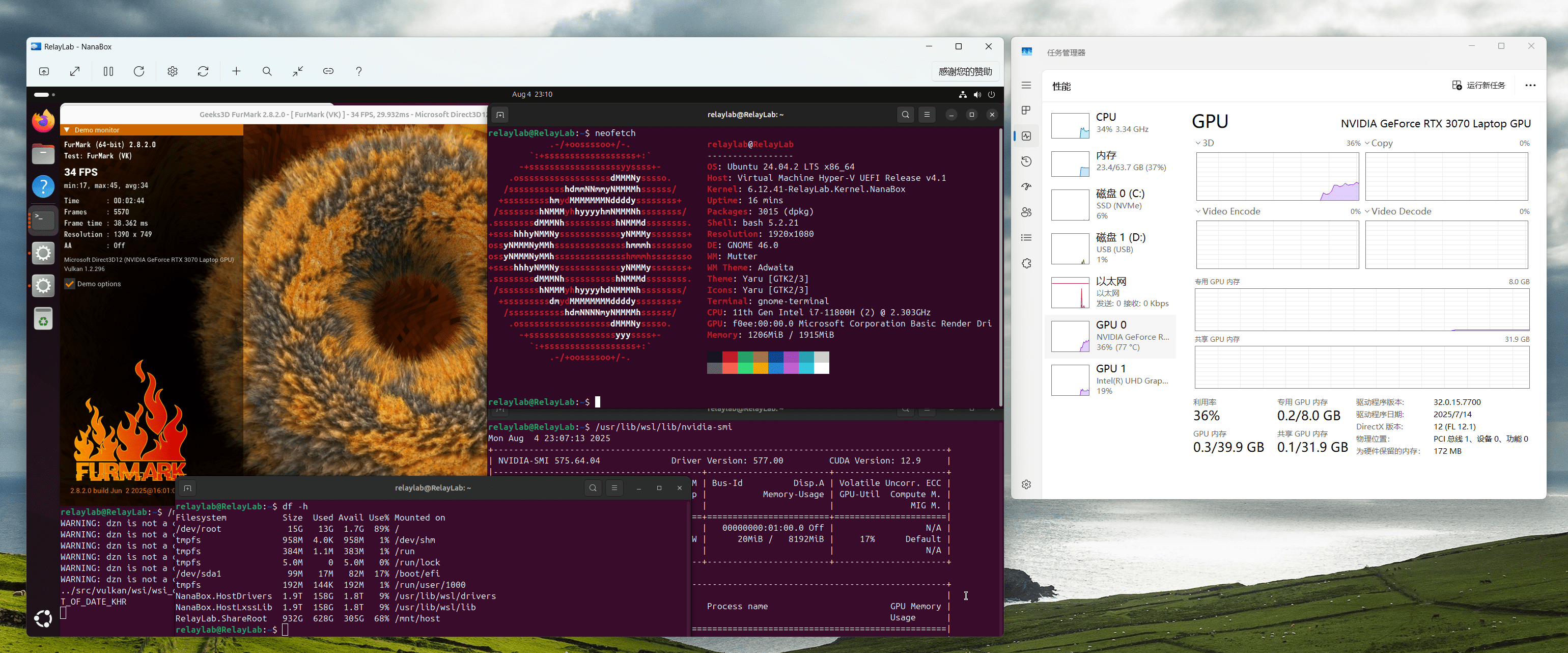
@MemQu Here is an OpenGL/Valkan example

This has achieved 3D graphics acceleration rendering for Linux.

https://github.com/M2Team/NanaBox

exa

@eric-gitta-moore
Copy link

eric-gitta-moore commented Aug 9, 2025

Has anyone tried it on the 6.14 kernel? After my efforts throughout the afternoon today, I still encountered a compilation error. It seems that there is something missing in vmalloc.h.

DKMS make.log for dxgkrnl-427645e3d for kernel 6.14.0-27-generic (x86_64)
Sat Aug  9 07:25:35 PM CST 2025
make: Entering directory '/usr/src/linux-headers-6.14.0-27-generic'
make[1]: Entering directory '/var/lib/dkms/dxgkrnl/427645e3d/build'
warning: the compiler differs from the one used to build the kernel
  The kernel was built by: x86_64-linux-gnu-gcc-13 (Ubuntu 13.3.0-6ubuntu2~24.04) 13.3.0
  You are using:           gcc-13 (Ubuntu 13.3.0-6ubuntu2~24.04) 13.3.0
  CC [M]  dxgmodule.o
dxgmodule.c: In function ‘dxg_pci_probe_device’:
dxgmodule.c:598:43: warning: suggest braces around empty body in an ‘if’ statement [-Wempty-body]
  598 |                 DXG_TRACE("err: %d",  ret);
      |                                           ^
  CC [M]  hmgr.o
hmgr.c: In function ‘expand_table’:
-hmgr.c:196:13: error: implicit declaration of function ‘vzalloc’; did you mean ‘kzalloc’? [-Werror=implicit-function-declaration]
  196 |             vzalloc(new_table_size * sizeof(struct hmgrentry));
      |             ^~~~~~~
      |             kzalloc
hmgr.c:195:21: warning: cast to pointer from integer of different size [-Wint-to-pointer-cast]
  195 |         new_entry = (struct hmgrentry *)
      |                     ^
-hmgr.c:205:17: error: implicit declaration of function ‘vfree’; did you mean ‘kvfree’? [-Werror=implicit-function-declaration]
  205 |                 vfree(table->entry_table);
      |                 ^~~~~
      |                 kvfree
cc1: some warnings being treated as errors
make[3]: *** [/usr/src/linux-headers-6.14.0-27-generic/scripts/Makefile.build:207: hmgr.o] Error 1
make[2]: *** [/usr/src/linux-headers-6.14.0-27-generic/Makefile:2002: .] Error 2
make[1]: *** [/usr/src/linux-headers-6.14.0-27-generic/Makefile:251: __sub-make] Error 2
make[1]: Leaving directory '/var/lib/dkms/dxgkrnl/427645e3d/build'
make: *** [Makefile:251: __sub-make] Error 2
make: Leaving directory '/usr/src/linux-headers-6.14.0-27-generic'

If the error is suppressed through dkms.conf, another error will still occur.

# dkms.conf
MAKE[0]="'make' -C {kernel_source_dir} M='{module_location}' CFLAGS_MODULE+='-Wno-error=implicit-function-declaration' modules"
dxgvmbus.c:1500:54: error: ‘VM_MAP’ undeclared (first use in this function); did you mean ‘VM_MTE’?

@eric-gitta-moore
Copy link

I have successfully built dxgkrnl on the 6.12.18 kernel. Here are the additional steps required. For each file, you need to add #include <linux/vmalloc.h>.

  • /usr/src/dxgkrnl-$VERSION/hmgr.c
  • /usr/src/dxgkrnl-$VERSION/ioctl.c
  • /usr/src/dxgkrnl-$VERSION/dxgadapter.c
  • /usr/src/dxgkrnl-$VERSION/dxgvmbus.c

After all the modifications are completed, the corresponding installation shell script is as follows

# make -j10 KERNELRELEASE=`uname -r` -C /lib/modules/`uname -r`/build M=/var/lib/dkms/dxgkrnl/$VERSION/build
# if 6.8 kernel
sed -i 's#eventfd_signal(event->cpu_event, 1);#eventfd_signal(event->cpu_event);#' /usr/src/dxgkrnl-$VERSION/dxgmodule.c
# if 6.12 kernal
sed -i '1i#include <linux/vmalloc.h>' /usr/src/dxgkrnl-$VERSION/dxgvmbus.c
sed -i '1i#include <linux/vmalloc.h>' /usr/src/dxgkrnl-$VERSION/hmgr.c
sed -i '1i#include <linux/vmalloc.h>' /usr/src/dxgkrnl-$VERSION/dxgadapter.c
sed -i '1i#include <linux/vmalloc.h>' /usr/src/dxgkrnl-$VERSION/ioctl.c

https://github.com/eric-gitta-moore/oneclick-gpu-pv/blob/main/dxgkrnl.sh

@LouisWayne
Copy link

Fren!!! you are genius - thank you for sharing this..!!

@Justsenger
Copy link

I have succeeded. Thank you all for your time and effort.

System info

debian@debian:~$ glxinfo -B
name of display: localhost:10.0
display: localhost:10  screen: 0
direct rendering: Yes
Extended renderer info (GLX_MESA_query_renderer):
    Vendor: Microsoft Corporation (0xffffffff)
    Device: D3D12 (NVIDIA GeForce RTX 3060) (0xffffffff)
    Version: 22.3.6
    Accelerated: yes
    Video memory: 44776MB
    Unified memory: no
    Preferred profile: core (0x1)
    Max core profile version: 4.2
    Max compat profile version: 4.2
    Max GLES1 profile version: 1.1
    Max GLES[23] profile version: 3.1
OpenGL vendor string: Microsoft Corporation
OpenGL renderer string: D3D12 (NVIDIA GeForce RTX 3060)
OpenGL core profile version string: 4.2 (Core Profile) Mesa 22.3.6
OpenGL core profile shading language version string: 4.20
OpenGL core profile context flags: (none)
OpenGL core profile profile mask: core profile

OpenGL version string: 4.2 (Compatibility Profile) Mesa 22.3.6
OpenGL shading language version string: 4.20
OpenGL context flags: (none)
OpenGL profile mask: compatibility profile

OpenGL ES profile version string: OpenGL ES 3.1 Mesa 22.3.6
OpenGL ES profile shading language version string: OpenGL ES GLSL ES 3.10

debian@debian:~$ uname -a
Linux debian 6.1.0-37-amd64 #1 SMP PREEMPT_DYNAMIC Debian 6.1.140-1 (2025-05-22) x86_64 GNU/Linux

However, I also reached the same conclusion as @MemQu. This only applies to ML and cannot accelerate any 3D effects, including those in the browser.

image

You need "--no-sandbox"

@gzg1984
Copy link

gzg1984 commented Dec 11, 2025

is the source only work in kernel 6.1 ? I tried 6.6 branch and there is code problem . It use wrong GUID compare feature that makes GUID doesn't match device type.

However, after I fix problem ,I found the nvidia-smi still doesn't work :

/usr/lib/wsl/lib/nvidia-smi

NVIDIA-SMI has failed because it couldn't communicate with the NVIDIA driver. Make sure that the latest NVIDIA driver is installed and running.

Failed to properly shut down NVML: Driver Not Loaded


I am sure the previous steps are correct because I can find /dev/dxg and after I enalbe the driver trace log I can findout these:


[ 5793.684936] dxgk: 000000007d7a5f0b 18484 18484
[ 5793.684943] dxgk: new dxgprocess created
[ 5793.685001] dxgk: send_sync_msg global: 0 0000000033a39403 584 4
[ 5793.685033] dxgk: waiting completion: 2
[ 5793.685138] dxgk: New adapter message: 0000000000000000
[ 5793.685140] dxgk: next packet (id, size, type): 2 8 11
[ 5793.685236] dxgk: completion done: 2 0
[ 5793.685239] dxgk: create_process returned 40000640
[ 5793.685267] dxgk: unlocked ioctl c018473e Code:62
[ 5793.685270] dxgk: found 0 adapters
[ 5793.685271] dxgk: Ioctl returned: 0
[ 5793.685272] dxgk: Ioctl returned: 0
[ 5793.685273] dxgk: unlocked ioctl c018473e Code:62
[ 5793.685279] dxgk: creating new process adapter info
[ 5793.685280] dxgk: 000000002497c92d 0000000001131e0e
[ 5793.685287] dxgk: adapter: 40000000 1:9e1a2fa2
[ 5793.685288] dxgk: found 1 adapters
[ 5793.685290] dxgk: Ioctl returned: 0
[ 5793.685291] dxgk: Ioctl returned: 0
[ 5793.685295] dxgk: unlocked ioctl c0184709 Code:9
[ 5793.685296] dxgk: Type: 13 Size: 4
[ 5793.685298] dxgk: send_sync_msg global: 0 000000003f7af329 59 8
[ 5793.685303] dxgk: waiting completion: 3
[ 5793.685438] dxgk: New adapter message: 0000000000000000
[ 5793.685440] dxgk: next packet (id, size, type): 3 8 11
[ 5793.685495] dxgk: completion done: 3 0
[ 5793.685497] dxgk: Ioctl returned: 0
[ 5793.685501] dxgk: unlocked ioctl c0184709 Code:9
[ 5793.685502] dxgk: Type: 48 Size: 430
[ 5793.685506] dxgk: send_sync_msg global: 0 0000000015916210 1127 1076
[ 5793.685510] dxgk: waiting completion: 4
[ 5793.685645] dxgk: New adapter message: 0000000000000000
[ 5793.685647] dxgk: next packet (id, size, type): 4 1080 11
[ 5793.685701] dxgk: completion done: 4 0
[ 5793.685705] dxgk: Ioctl returned: 0
[ 5793.685910] dxgk: 000000007d7a5f0b, 00000000974f4c77
[ 5793.685913] dxgk: 000000002497c92d 0000000001131e0e
[ 5793.685914] dxgk: 000000000f25234a 40000000
[ 5793.685918] dxgk: send_sync_msg global: 0 00000000fb3ef67d 40 4
[ 5793.685922] dxgk: waiting completion: 5
[ 5793.686019] dxgk: New adapter message: 0000000000000000
[ 5793.686021] dxgk: next packet (id, size, type): 5 8 11
[ 5793.686035] dxgk: completion done: 5 0


package type 11 means complete (according to the source code enum define string).

Then ,I think this log means: I have successfully created /dev/dxg and have used correct nvidia-smi to send package through MS vmbus, most case it should make everything work.

But NO.

My nvidia-smi still doesn't work and my glxinfo and vulkaninfo still doesn't found new renderer.

The only reason I can image is : for some reason, this driver only work on kernel 6.1.

I just wanna show what I found before I swith my kernel to 6.1-- because it will make more work for me.

maybe I will report the result after I checked it on kernel 6.1.

@Justsenger
Copy link

is the source only work in kernel 6.1 ? I tried 6.6 branch and there is code problem . It use wrong GUID compare feature that makes GUID doesn't match device type.

However, after I fix problem ,I found the nvidia-smi still doesn't work :

/usr/lib/wsl/lib/nvidia-smi

NVIDIA-SMI has failed because it couldn't communicate with the NVIDIA driver. Make sure that the latest NVIDIA driver is installed and running.

Failed to properly shut down NVML: Driver Not Loaded

I am sure the previous steps are correct because I can find /dev/dxg and after I enalbe the driver trace log I can findout these:

[ 5793.684936] dxgk: 000000007d7a5f0b 18484 18484 [ 5793.684943] dxgk: new dxgprocess created [ 5793.685001] dxgk: send_sync_msg global: 0 0000000033a39403 584 4 [ 5793.685033] dxgk: waiting completion: 2 [ 5793.685138] dxgk: New adapter message: 0000000000000000 [ 5793.685140] dxgk: next packet (id, size, type): 2 8 11 [ 5793.685236] dxgk: completion done: 2 0 [ 5793.685239] dxgk: create_process returned 40000640 [ 5793.685267] dxgk: unlocked ioctl c018473e Code:62 [ 5793.685270] dxgk: found 0 adapters [ 5793.685271] dxgk: Ioctl returned: 0 [ 5793.685272] dxgk: Ioctl returned: 0 [ 5793.685273] dxgk: unlocked ioctl c018473e Code:62 [ 5793.685279] dxgk: creating new process adapter info [ 5793.685280] dxgk: 000000002497c92d 0000000001131e0e [ 5793.685287] dxgk: adapter: 40000000 1:9e1a2fa2 [ 5793.685288] dxgk: found 1 adapters [ 5793.685290] dxgk: Ioctl returned: 0 [ 5793.685291] dxgk: Ioctl returned: 0 [ 5793.685295] dxgk: unlocked ioctl c0184709 Code:9 [ 5793.685296] dxgk: Type: 13 Size: 4 [ 5793.685298] dxgk: send_sync_msg global: 0 000000003f7af329 59 8 [ 5793.685303] dxgk: waiting completion: 3 [ 5793.685438] dxgk: New adapter message: 0000000000000000 [ 5793.685440] dxgk: next packet (id, size, type): 3 8 11 [ 5793.685495] dxgk: completion done: 3 0 [ 5793.685497] dxgk: Ioctl returned: 0 [ 5793.685501] dxgk: unlocked ioctl c0184709 Code:9 [ 5793.685502] dxgk: Type: 48 Size: 430 [ 5793.685506] dxgk: send_sync_msg global: 0 0000000015916210 1127 1076 [ 5793.685510] dxgk: waiting completion: 4 [ 5793.685645] dxgk: New adapter message: 0000000000000000 [ 5793.685647] dxgk: next packet (id, size, type): 4 1080 11 [ 5793.685701] dxgk: completion done: 4 0 [ 5793.685705] dxgk: Ioctl returned: 0 [ 5793.685910] dxgk: 000000007d7a5f0b, 00000000974f4c77 [ 5793.685913] dxgk: 000000002497c92d 0000000001131e0e [ 5793.685914] dxgk: 000000000f25234a 40000000 [ 5793.685918] dxgk: send_sync_msg global: 0 00000000fb3ef67d 40 4 [ 5793.685922] dxgk: waiting completion: 5 [ 5793.686019] dxgk: New adapter message: 0000000000000000 [ 5793.686021] dxgk: next packet (id, size, type): 5 8 11 [ 5793.686035] dxgk: completion done: 5 0

package type 11 means complete (according to the source code enum define string).

Then ,I think this log means: I have successfully created /dev/dxg and have used correct nvidia-smi to send package through MS vmbus, most case it should make everything work.

But NO.

My nvidia-smi still doesn't work and my glxinfo and vulkaninfo still doesn't found new renderer.

The only reason I can image is : for some reason, this driver only work on kernel 6.1.

I just wanna show what I found before I swith my kernel to 6.1-- because it will make more work for me.

maybe I will report the result after I checked it on kernel 6.1.

Based on your situation, there's no need for repeated testing. Simply use ExhyperV to add a GPU partition to your Linux system without any problems, and then you can leave the keyboard and wait for it to complete.

@gzg1984
Copy link

gzg1984 commented Dec 11, 2025

Based on your situation, there's no need for repeated testing. Simply use ExhyperV to add a GPU partition to your Linux system without any problems, and then you can leave the keyboard and wait for it to complete.

I don't understand.

I already added GPU-VP into VM and I can check it in powershell:


PS C:\WINDOWS\system32> Get-VMGpuPartitionAdapter -VMName Ubuntu24

MinPartitionVRAM :
MaxPartitionVRAM :
OptimalPartitionVRAM :
MinPartitionEncode :
MaxPartitionEncode :
OptimalPartitionEncode :
MinPartitionDecode :
MaxPartitionDecode :
OptimalPartitionDecode :
MinPartitionCompute :
MaxPartitionCompute :
OptimalPartitionCompute :
Name : GPU 分区设置
Id : Microsoft:6C2C51AD-A005-4C4B-930C-979458C4BA7B\9B749B1D-7B2C-4C8E-8CE2-0A0FF8D177C4
VMId : 6c2c51ad-a005-4c4b-930c-979458c4ba7b
VMName : Ubuntu24
VMSnapshotId : 00000000-0000-0000-0000-000000000000
VMSnapshotName :
CimSession : CimSession: .
ComputerName : ZHIGANGGAO-PC1
IsDeleted : False
VMCheckpointId : 00000000-0000-0000-0000-000000000000
VMCheckpointName :


And after you mention, I tried the tool "ExhyperV " and it doesn't work either.

Looking into its log ,it does similar things I did. And it cannot pass the kernel module installing step


depmod...


after this , it meets error and stopped.

@Justsenger
Copy link

Justsenger commented Dec 11, 2025

Based on your situation, there's no need for repeated testing. Simply use ExhyperV to add a GPU partition to your Linux system without any problems, and then you can leave the keyboard and wait for it to complete.

I don't understand.

I already added GPU-VP into VM and I can check it in powershell:

PS C:\WINDOWS\system32> Get-VMGpuPartitionAdapter -VMName Ubuntu24

MinPartitionVRAM : MaxPartitionVRAM : OptimalPartitionVRAM : MinPartitionEncode : MaxPartitionEncode : OptimalPartitionEncode : MinPartitionDecode : MaxPartitionDecode : OptimalPartitionDecode : MinPartitionCompute : MaxPartitionCompute : OptimalPartitionCompute : Name : GPU 分区设置 Id : Microsoft:6C2C51AD-A005-4C4B-930C-979458C4BA7B\9B749B1D-7B2C-4C8E-8CE2-0A0FF8D177C4 VMId : 6c2c51ad-a005-4c4b-930c-979458c4ba7b VMName : Ubuntu24 VMSnapshotId : 00000000-0000-0000-0000-000000000000 VMSnapshotName : CimSession : CimSession: . ComputerName : ZHIGANGGAO-PC1 IsDeleted : False VMCheckpointId : 00000000-0000-0000-0000-000000000000 VMCheckpointName :

And after you mention, I tried the tool "ExhyperV " and it doesn't work either.

Looking into its log ,it does similar things I did. And it cannot pass the kernel module installing step

depmod...

after this , it meets error and stopped.

So why is your Ubuntu 24 kernel 6.6 or lower? This is highly unreasonable. You should download and perform a clean install of Ubuntu 22.04 with a 6.8.0-87-generic kernel, then run exhyperv's auto-installer. If that still doesn't work, I'll eat my phone.

@gzg1984
Copy link

gzg1984 commented Dec 11, 2025

do not eat your phone. it is innocent.


if [ ! -f "/lib/modules/${TARGET_KERNEL_VERSION}/updates/dkms/dxgkrnl.ko" ]; then
    echo "Error: DKMS installation failed (Module file not found)."
    exit 1
fi

but


zhiganggao@zhiganggao-Virtual-Machine:/lib/modules/6.8.0-88-generic/updates/dkms$ ls -lrt
total 190460
-rw-r--r-- 1 root root 127246528 Dec 9 15:22 nvidia.ko
-rw-r--r-- 1 root root 59327648 Dec 9 15:22 nvidia-uvm.ko
-rw-r--r-- 1 root root 2974488 Dec 9 15:22 nvidia-modeset.ko
-rw-r--r-- 1 root root 5012888 Dec 9 15:22 nvidia-drm.ko
-rw-r--r-- 1 root root 365632 Dec 9 15:22 nvidia-peermem.ko
-rw-r--r-- 1 root root 81137 Dec 11 16:02 dxgkrnl.ko.zst
zhiganggao@zhiganggao-Virtual-Machine:/lib/modules/6.8.0-88-generic/updates/dkms$ file dxgk*
dxgkrnl.ko.zst: Zstandard compressed data (v0.8+), Dictionary ID: None


this script just doesn't recognize the dxgkrnl.ko.zst format module.

@Justsenger
Copy link

do not eat your phone. it is innocent.

if [ ! -f "/lib/modules/${TARGET_KERNEL_VERSION}/updates/dkms/dxgkrnl.ko" ]; then
    echo "Error: DKMS installation failed (Module file not found)."
    exit 1
fi

but

zhiganggao@zhiganggao-Virtual-Machine:/lib/modules/6.8.0-88-generic/updates/dkms$ ls -lrt total 190460 -rw-r--r-- 1 root root 127246528 Dec 9 15:22 nvidia.ko -rw-r--r-- 1 root root 59327648 Dec 9 15:22 nvidia-uvm.ko -rw-r--r-- 1 root root 2974488 Dec 9 15:22 nvidia-modeset.ko -rw-r--r-- 1 root root 5012888 Dec 9 15:22 nvidia-drm.ko -rw-r--r-- 1 root root 365632 Dec 9 15:22 nvidia-peermem.ko -rw-r--r-- 1 root root 81137 Dec 11 16:02 dxgkrnl.ko.zst zhiganggao@zhiganggao-Virtual-Machine:/lib/modules/6.8.0-88-generic/updates/dkms$ file dxgk* dxgkrnl.ko.zst: Zstandard compressed data (v0.8+), Dictionary ID: None

this script just doesn't recognize the dxgkrnl.ko.zst format module.

This is because you enabled kernel module compression, and it shouldn't be the responsibility of any repository owner. Try running the entire ExHyperV process again; .zst support is now included.

Sign up for free to join this conversation on GitHub. Already have an account? Sign in to comment