
February 12, 2026
If you're a developer in China trying to use Claude Code, you've probably hit the 403 wall. This guide covers how to get it working in three scenarios:
- macOS Terminal (shell) - using
claudeCLI directly in your terminal - VS Code Terminal - using
claudeCLI inside VS Code's integrated terminal - VS Code Claude Code Extension - using the Claude Code chat panel (installed as a VS Code extension)
All three scenarios share the same root cause and solution, but each has its own gotchas.
You'll see one of these:
OAuth error: Failed to fetch user roles: Request failed with status code 403
Unable to connect to Anthropic services
Failed to connect to api.anthropic.com: ERR_BAD_REQUEST
Note: Claude Code might not be available in your country.
I spent a morning fighting this. Here's everything I learned so you don't have to.
Anthropic blocks API access from Chinese IPs. This affects everything — OAuth login, API calls, the CLI, and VS Code extensions. Even with a paid Claude Max subscription, you'll get 403'd if your traffic originates from China.
A quick test:
curl -I https://api.anthropic.comIf you see HTTP/2 403 — you're blocked. If you see a timeout — DNS or firewall issue.
The auth code exchange succeeds (you get a code from the browser), but the roles endpoint returns 403. Re-running /login, clearing credentials, switching browsers — none of it helps. The block is IP-based, not account-based.
Adding this to VS Code settings:
{
  "http.proxy": "http://127.0.0.1:7890"
}
Did not fix the Claude extension for me. The extension may not respect VS Code's proxy settings.
macOS GUI apps launched from the Dock or Finder do not inherit shell environment variables. So even if you have HTTPS_PROXY set in your ~/.zshrc, VS Code won't see it when launched the normal way.
I use Clash with a proxy server outside China. Any VPN/proxy tool works (V2Ray, Shadowsocks, etc.) - you just need an HTTP proxy endpoint.
You need to know your proxy's HTTP port number. Where to find it:
- Clash: Settings → HTTP Port (default
7890) - V2Ray: check your config file's
inboundssection for the HTTP proxy port - Shadowsocks: usually
1080(SOCKS) or check your client's HTTP proxy setting
My Clash runs locally on port 7890 (yours may differ - use your own port throughout this guide). Verify it works:
curl -I --proxy http://127.0.0.1:7890 https://api.anthropic.comYou should see HTTP/1.1 200 Connection established followed by a non-403 response (404 is fine — it means you reached Anthropic's servers).
macOS (zsh):
echo 'export HTTPS_PROXY="http://127.0.0.1:7890"' >> ~/.zshrc
source ~/.zshrc
Linux (bash):
echo 'export HTTPS_PROXY="http://127.0.0.1:7890"' >> ~/.bashrc
source ~/.bashrcWith HTTPS_PROXY set, login works directly:
claude /loginThe OAuth flow completes successfully - browser opens, you get the auth code, paste it back, and the roles endpoint no longer 403s because your traffic is routed through the proxy.
If you had a previous broken login, clear the state first:
claude /logout
claude /login
After login, claude works normally in any terminal session (as long as HTTPS_PROXY is set).
If you launch VS Code from the terminal, its integrated terminal inherits your shell's HTTPS_PROXY. So claude CLI works inside VS Code's terminal too.
The key: you must launch VS Code from the terminal, not from Dock/Finder (see "What Doesn't Work" above).
On macOS, if code is mapped to another editor (mine was mapped to Cursor), use:
open -a "Visual Studio Code" .You can make an alias for convenience:
echo 'alias vscode="open -a \"Visual Studio Code\""' >> ~/.zshrc
source ~/.zshrc
# Then just:
vscode .The Claude Code extension (the chat panel inside VS Code) also needs HTTPS_PROXY to reach Anthropic's servers. The same rule applies: launch VS Code from the terminal so the extension process inherits the proxy variable.
Once VS Code is launched this way, open the Claude Code chat panel - it should connect without 403.
If you SSH into a remote machine (e.g., a Linux VM) from VS Code, the Claude extension runs on the remote side. So the remote machine also needs HTTPS_PROXY set.
My setup: MacBook Pro running an Ubuntu VM via Parallels. The Mac's bridge interface is 192.168.2.1, so on the VM:
echo 'export HTTPS_PROXY="http://192.168.2.1:7890"' >> ~/.bashrc
source ~/.bashrc
Make sure your proxy allows LAN connections (in Clash, enable Allow LAN).
Then launch VS Code from the terminal on the Mac side, open a Remote SSH session, and the Claude extension works on the remote machine too.
| Step | What to do |
|---|---|
| 1 | Run a proxy/VPN (Clash, V2Ray, etc.) |
| 2 | Set HTTPS_PROXY=http://127.0.0.1:<port> in your shell rc file |
| 3 | claude /logout then claude /login for CLI |
| 4 | Launch VS Code from terminal (not Dock) for the extension |
| 5 | Set HTTPS_PROXY on remote machines too, pointing to your proxy's LAN IP |
The fundamental issue is simple: Anthropic blocks Chinese IPs, and macOS GUI apps don't inherit shell env vars. Once you understand these two facts, everything falls into place.
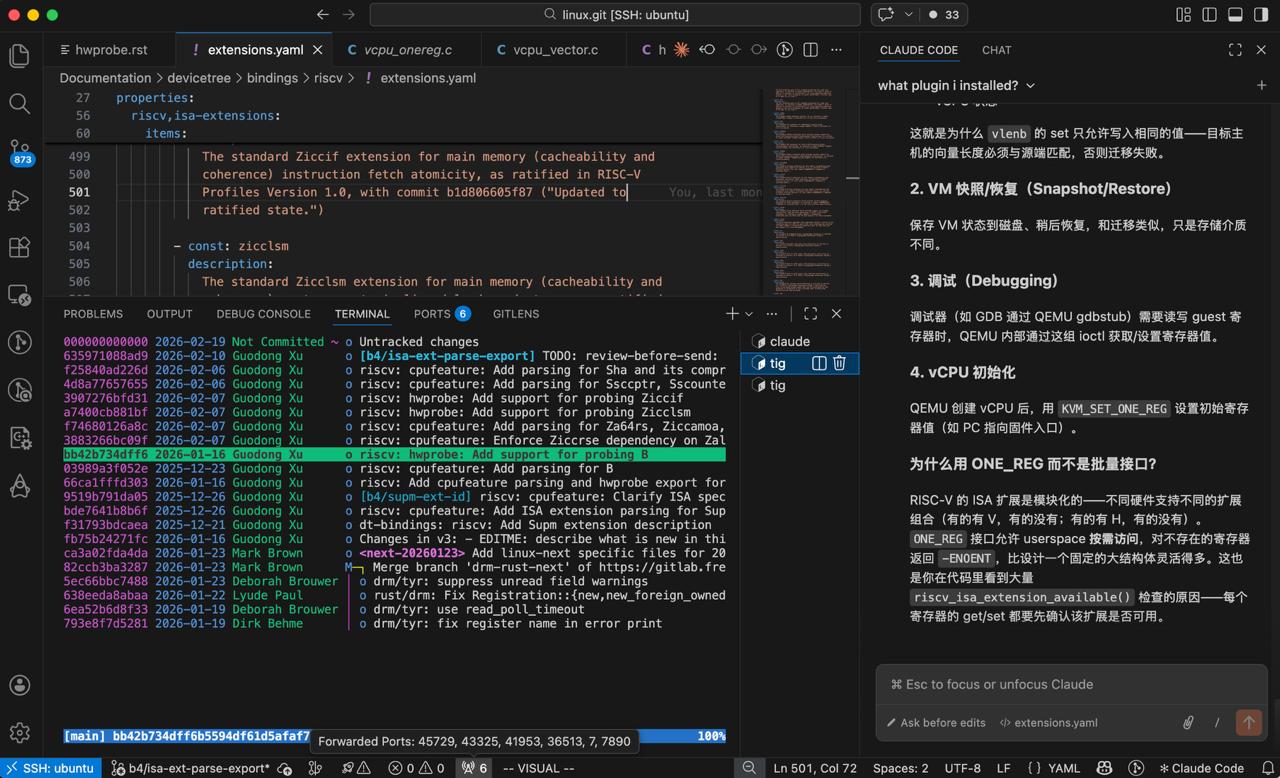
VS Code with Claude Code extension running - the chat panel on the right, claude CLI in the terminal, and a Remote SSH session to a Linux VM. All working through the proxy.
Setup: MacBook Pro + Ubuntu VM (Parallels) in China, Claude Max subscription, Clash proxy, Claude Code v2.1.39


Hey i got it to work in similar way for my chinese home wifi, but .. now im struggling getting it to work in a hotel using captive wifi, or my sim card from abroad using hotspot to laptop. Would / could be cool with a solution for that too. I started looking into it a couple of hours ago as i checked in to the hotel here in beijing, yet to find a way. -- edit -- ok so with astrill vpn i managed to get it working by using export no_proxy='*'
claude in terminal.