
-
-
Save darcyparker/1886716 to your computer and use it in GitHub Desktop.
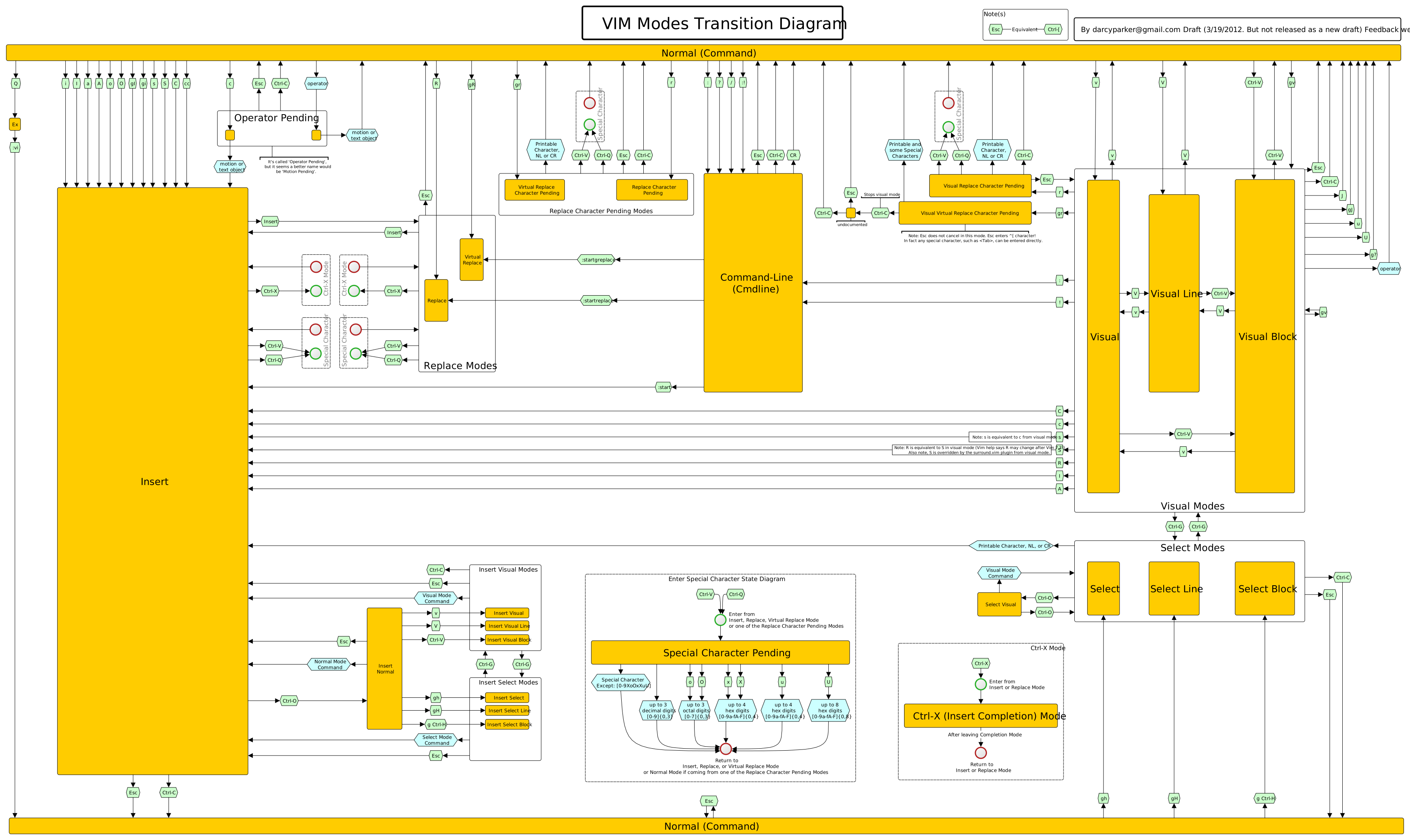


'd' and 'y' appear to be missing, but I'm assuming that it is intended that the lozenge labeled 'operator' is intended to cover these cases.
Is there a key or additional information which further defines these, perhaps enumerating the possible cases? For the 'Printable Character, NL or CR', but a list of known operators would be quite helpful for the learner.
What I've been looking for is some sort of state machine description or transition diagram or table which delineates valid normal mode commands. Meaning, those which end up either modifying the buffer, or end up with a value landing in a register, something like that. This is as opposed to a sequence of keystrokes that are nonsensical, and end up being ignored and dumping you right back to normal mode with no pending commands being authored. For instance, dm appears to be meaningless, and just results in landing back in normal mode as if you hadn't pressed any keys at all.
Another case of interest to me is something like dvvvvvvvvvvvvj, which seems to be equivalent to dvj. I'm not sure why this would be allowed, but it is.
Maybe the information I'm looking for is present, and I'm just not seeing it?
See vim/vim#13091 - A bug about the
undocumentedmode mentioned in this diagram was just fixed in vim and therefore nvim.